
Greenvale Secondary College places a high value on student learning and academic growth which is at the forefront of everything we do.
Developing each student’s potential and ability to the fullest is strengthened by the integration of digital technologies as educational tools. Digital learning devices provide opportunities for the development of essential learning skills such as collaboration, communication, creativity and problem-solving, enhancing student learning.
1:1 Program
Although students may not use their device in every class, it is an essential learning tool and they will need their device every day to access digital textbooks, resources and complete learning activities for all their subjects, both at school and at home.
Purchasing A Device Through Learning With Technologies
We strongly recommend that a device is purchased through the schools recommended supplier to ensure compatibility and to streamline the process of getting the device ready for our curriculum.
If you would like to purchase a device through the school’s supplier this can be done through the Learning With Technologies portal which can be accessed via clicking the link below.
Bringing Your Own Device
In the event that a device cannot be purchased. Families can use a device from home, provided that it meets the minimum requirements and specifications. (Windows based laptop).
If you require assistance in determining if your device is eligible and meets the technical requirements. Please feel free to download our device eligibility checking tool below.
Download Eligibility Checking Tool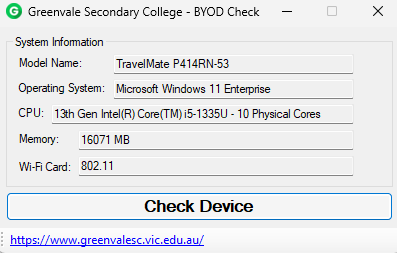
Once downloaded, simply click ‘Check Device’ in order to determine your device’s eligibility.
Please note that this program accesses the hardware information on your device. If you have any questions or concerns around this, please don’t hesitate to contact our IT department via it@greenvalesc.vic.edu.au
Alternatively, you can view the specifications requirements checklist below.
Download BYOD Requirements Checklist
If you are planning on bringing your own device, there are some programs that are required for our curriculum that will need to be installed before the student commences at Greenvale Secondary College.
- Microsoft Office365 – A license will be provided by the Department of Education once a student has been enrolled.
- Microsoft Teams (Work or School version)
Further information around how to install these programs can be accessed via the link below.
Download BYOD Guides
Alongside this, if you are bringing your own device from home, it will need to be configured by our IT department.
If you are bringing your own device from home, it must be assessed and configured by our IT department.
You must present your device to the College on one of the scheduled inspection days being the 19th, 20th, or 21st of January 2026, prior to commencing at the College. All devices must be checked for compatibility during one of these dates.
If your device meets the required specifications, it will be set up and configured for use for the beginning of Term 1, 2026 and returned to you that same day. If it does not meet the specifications, you will be notified of the deficiencies, and the device will be returned to you.
We strongly recommend confirming your device’s compatibility before the ordering cut-off date of the 29th of November 2025, in case a new device needs to be purchased through the College’s provider, Learning With Technology.
If further assistance is required, please don’t hesitate to contact our IT team by calling the College on (03) 8393 0000 or via email at it@greenvalesc.vic.edu.au
Compass
Compass is our online administrative portal for families, students and teachers. Students use Compass to access:
- daily updates to their class and co-curricular timetables
- excursion and event information
- school notices and communications
- email teachers
- semester reports, NAPLAN results and Learning Behaviour Reports
For more information on Compass for families, see Compass
Digital Learning Support
For Year 7 families, we run an information session to assist with laptop purchase, requirements, set up and managing it at home. In addition, all Year 7 students participate in our ‘Laptop Bootcamp’ early in Term 1 to help them connect to the school network, download and use DET-provided software, login to Compass and Microsoft Teams, and print. We also run a cybersafety workshop in Term 1 and reinforce this with learning activities in the G5 program.
Digital Textbooks and Software
Our students purchase and access digital textbooks for some of their subjects to use on their digital devices. For more information, see Booklists
Students are provided with free school-licensed and government-provided software for their device.
Acceptable Use
We have an Acceptable Use Agreement that outlines the requirements and expectations for students when using devices and the school network. All students and parents or carers are required to read, understand and sign this agreement at the start of the school year and this detail is include in the Enrolment Information Handbook